

.png)


Instagram Carousel: The Complete Guide to Creating Posts That Drive Engagement in 2026
Learn what it is, how to create and post an Instagram carousel, discover the ideal size, see Instagram carousel post examples, and find Instagram carousel ideas to boost your brand’s engagement.
In this guide, you’ll discover:
- What is an Instagram carousel and why it has become the platform’s highest-engagement format.
- How to create an Instagram carousel on mobile and desktop, with an updated step-by-step guide.
- The ideal Instagram carousel size and how many photos fit in an Instagram carousel.
- How to create a carousel with AI in seconds, without opening Canva or worrying about dimensions.
- 8 Instagram carousel ideas, tested with post examples you can adapt for your brand.
- How to create a creative Instagram carousel with the infinite carousel effect and design tips.
If you scroll through your feed every day, you’ve probably noticed: the Instagram carousel has become the dominant format among brands, creators, and professional social media managers. It’s no coincidence. A Social Insider study of more than 22 million posts showed that carousels have the highest engagement rate on the platform, surpassing single photos and videos.
In this article, we’ll walk you through everything about the Instagram carousel — from what an Instagram carousel is and how to post one in practice, to the correct Instagram carousel size, post examples, ready-to-use ideas, and how to create a carousel with AI to save hours of manual work.
But if you want to skip ahead and generate your first creative Instagram carousel in under 1 minute, just try BestContent Social’s carousel generator:
Create a carousel with AI for free →
What is an Instagram carousel?
O Instagram carousel is a post format that allows you to combine up to 20 images or videos in a single post. It works like an album: the user swipes sideways (or upward, in the case of related Reels and Stories) to view all the content.
Officially launched by Instagram in 2017, the carousel format quickly gained popularity because it solves an old limitation of the social network: telling longer stories, explaining a topic in depth, or showing a product from multiple angles — all within a single feed post.
You can identify a carousel in the feed by two signs: the stacked slides icon in the top right corner of the image and the dots at the bottom indicating how many slides exist. When creating the post, you can mix photos and videos in the same sequence, apply filters individually or in bulk, and rearrange the order of the media before publishing.

Why invest in Instagram carousel posts?
Now that you understand what an Instagram carousel is, it’s worth explaining why it should be part of your content plan. If you manage a professional profile, there’s a very direct reason to adopt the format: results. Instagram carousel performance data is consistently superior to any other organic format on the platform.
But before diving into the data, here’s a step back: Instagram is today the leading platform for organic visual content. If you’re still deciding which networks to focus your efforts on, read our updated guide: The most used social networks in Brazil in 2025: ranking and global comparison.
Engagement data
- According to Search Engine Journal, carousels have an engagement rate approximately 10% higher than single images and up to 33% higher than feed videos.
- O Instagram Engagement Report shows an average engagement rate of 7.2% for carousels, compared to 5.8% for photos and 6.3% for videos.
- Commercial profiles with up to 500K followers and creators with up to 100K followers benefit the most from the carousel format, according to the same study.
Why the algorithm favors this format
Instagram’s algorithm prioritizes content that holds the user’s attention. And that’s exactly where carousels win: each swipe is a signal to the algorithm that the post is worth showing to more people. Additionally, if the user didn’t engage with the first image, Instagram automatically shows the second one in the feed — a kind of second chance that no other format has.
Use cases where carousels stand out
- Replacing long captions: instead of a wall of text in the caption, you break the content into visual slides and hold attention.
- Educating your audience: tutorials, lists, and step-by-steps perform very well as Instagram carousel posts.
- Showcasing products: showing the product from multiple angles, in different usage contexts, with zoomed-in details.
- Storytelling: telling a story with a beginning, middle, and end across the slides.
- Story shares: recognizable content (memes, signs, opinions) gets frequently reshared, multiplying your carousel’s reach.
To make the most of this effect, it’s worth understanding how to strategically repost Stories — including third-party content and customer mentions. Read the full guide: How to Repost Stories on Instagram: complete step-by-step guide.
How many photos fit in an Instagram carousel and what’s the ideal size?
Two questions that always come up when someone is starting out with the format: how many photos fit in an Instagram carousel and what’s the correct Instagram carousel size to avoid any cropping.
How many photos fit in an Instagram carousel?
The current Instagram limit is 2 to 20 media per carousel — the platform expanded from 10 to 20 slides in recent years, giving even more room for educational content and portfolios. But in practice, carousels between 5 and 10 slides tend to perform best. Fewer than that, the format loses its impact; more than that, engagement tends to drop because few people make it to the end.
Golden tip: think of the first slide as a magazine cover — it’s the one that will decide whether the user stops scrolling or not. And use the last slide for a clear CTA (like, save, comment, visit the link in bio).
Instagram carousel size: the official dimensions
This is something many people still get wrong. Instagram accepts three main carousel post formats, but the vertical format (4:5) takes up the most feed space and has been prioritized by the algorithm:
Format
Dimensions (pixels)
Aspect Ratio
Square
1080 x 1080
1:1
Vertical (recommended)
1080 x 1350
4:5
Horizontal
1080 x 566
1.91:1
Practical rule: define the size before you start creating. If you mix different aspect ratios in the same Instagram carousel, Instagram will force all slides to match the first one’s format — and crop the rest. Choose 4:5 for best performance and keep that size across all slides.
Instagram carousel format for ads
If you’re going to boost a carousel post, the recommended dimensions are 1080 x 1080 pixels (1:1), with JPG or PNG files up to 30 MB per image. For videos, use MP4 or MOV with up to 60 seconds duration and a maximum file size of 4 GB per file.
Want a more complete guide to all Instagram formats? Read our article on Instagram post sizes in 2026.
How to create an Instagram carousel: step by step
The good news is that creating an Instagram carousel has no technical mystery. The process is almost identical to a regular post, with one extra step when selecting media. Below is the updated step-by-step for mobile and desktop.
How to create an Instagram carousel on mobile
- Open the Instagram app and tap the “+” icon at the bottom center of the screen, then “Post”.
- Tap the multiple selection icon (two overlapping squares) in the media gallery. On iOS, you can also simply hold the first photo until a number appears — this activates multiple selection mode.
- Select 2 to 20 images and videos in the order you want them to appear. The numbers that appear in the corner of each media item indicate their position in the carousel.
- Toque em “Avançar” to edit each slide. You can apply filters, brightness, and saturation adjustments individually to each media item or all at once.
- Rearrange the order by holding and dragging each slide if needed. This is where you define the narrative of your Instagram carousel post.
- Write the caption, add hashtags, tag accounts and location, and tap “Share”. Your carousel is now published.

How to post an Instagram carousel from desktop
Fewer people know this, but you can also post an Instagram carousel from your computer — great for those who create their graphics in Canva, Photoshop, or Figma and don’t want to waste time sending everything to their phone first.
- Go to instagram.com in your browser and log in normally.
- Click the “+” icon at the top of the screen (“Create”).
- Drag images and videos into the window or click “Select from computer” and select all files at once (use Ctrl/Cmd for multiple selection).
- Adjust the order by dragging slides, edit each one individually if you want, and follow the normal steps to publish.
Tip: Instagram desktop still has some limitations compared to mobile — for example, not all filters are available. But for those who already deliver finished artwork, it’s a huge productivity gain.
How to create a carousel with AI in seconds
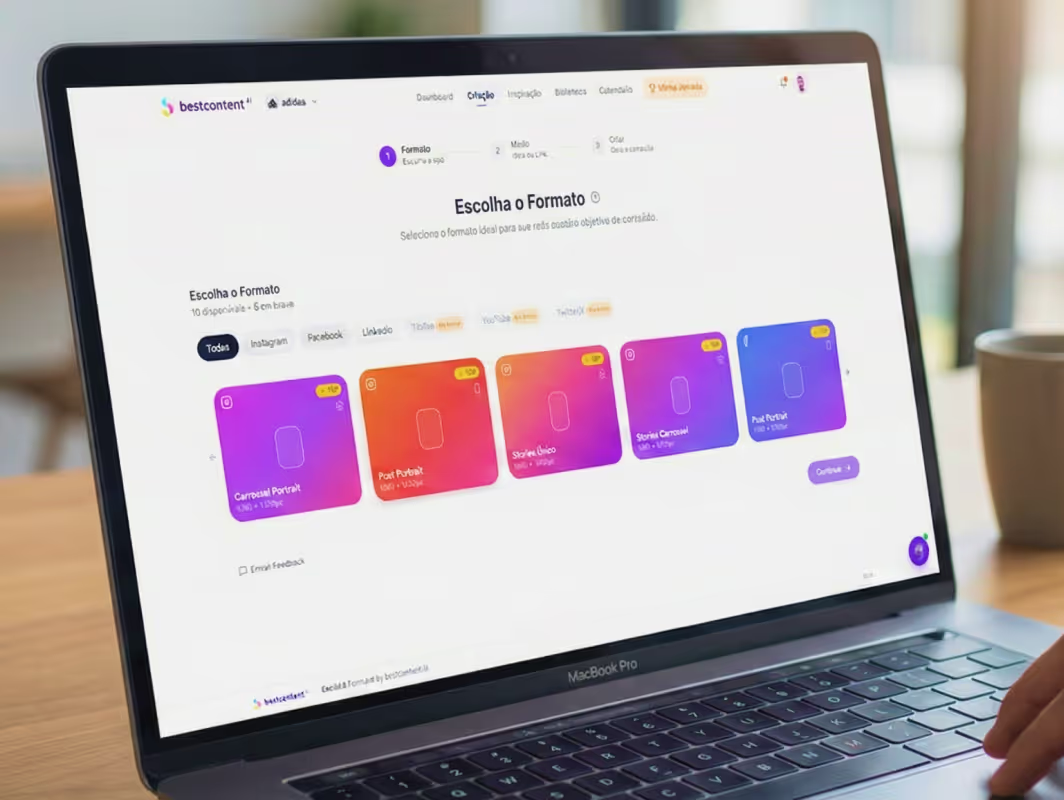
Now the part where we show you how to save hours of manual work per week. If you already have the process of create a carousel with AI running, you know there’s no going back: instead of spending 40 minutes laying out slide by slide in Canva, you describe the post topic, the AI generates the slide text, applies your brand’s visual identity, and delivers a ready-to-publish Instagram carousel.
That’s exactly what BestContent Social does. The platform’s carousel generator uses AI to:
- Suggest Instagram carousel ideas based on your niche and current trends, if you’re stuck.
- Generate the copy for each slide — cover, development, closing, and CTA — tailored to your audience.
- Automatically apply your brand’s visual identity : logo, color palette, typography, and image style.
- Adjust the Instagram carousel size to the ideal format (1080 x 1350 px), without you having to worry about pixels.
- Schedule the publication directly on the platform, without relying on separate tools.
In practice, it works like this: you type something like “5 mistakes that destroy Instagram engagement” and, in seconds, you have a creative Instagram carousel with 6 to 8 slides, sharp copy, design aligned with your brand, and a suggested caption. You can edit anything before publishing.
Try the AI carousel generator for free →
8 Instagram carousel ideas (with examples)
Having the format mastered is half the battle. The other half is knowing what to post. Below are 8 Instagram carousel ideas that work in virtually any niche, with post examples you can adapt for your brand. Each example here was tested on real profiles and works because it follows a clear structure of opening, development, and closing.
1. Step-by-step tutorial
Probably the most classic use of the format and perhaps the most replicated Instagram carousel post example. Each slide teaches one step of the process, with clean visuals and short text. Works for product tutorials, recipes, how to use a service, assembly instructions. Example: “How to use our facial serum in 3 steps”.
2. List or ranking
Lists are highly saved by users — and saving is one of the strongest signals for the algorithm. Use the Instagram carousel to rank common mistakes, best tools, essential tips, myths vs. facts. Example: “7 mistakes that kill your profile’s engagement”.
3. Before and after
Perfect for visual niches like beauty, design, fitness, renovation, and architecture. The contrast between the “before” slide and the “after” slide generates immediate curiosity and encourages swiping.
4. Storytelling
Tell a story in chapters: the problem (slide 1), the turning point (slides 2 to 4), the solution (slides 5 to 7), the lesson (slide 8). This is one of the Instagram carousel post formats that generates the most comments and shares — because people relate to it.
5. Behind-the-scenes and “dumps”
Photo dumps (compilations of photos from an event, week, or month) have become Instagram’s native language. For brands, they work very well for showing production behind-the-scenes, internal events, team trips, and launch making-ofs.
6. Customer testimonials and case studies
One slide per testimonial, with the customer’s name, photo, and highlight quote. It’s pure social proof and builds trust with those who haven’t yet bought.
7. Product presentation
When the Instagram carousel is used to sell, it becomes a mini landing page. First slide with the promise, middle slides showing the product in use and different angles, final slide with a clear CTA pointing to the link in bio.
8. Educational series in parts
Create a sequence of carousels on the same topic — “Part 1”, “Part 2”, “Part 3”. This encourages the user to follow you so they don’t miss the next post and creates a cumulative authority effect.
No inspiration to get started? BestContent’s post idea generator gives you dozens of Instagram carousel suggestions based on your niche, in seconds.
How to create a creative Instagram carousel
Mastering the basics is enough to deliver good work. But if you really want to stand out in the feed, it’s worth knowing some techniques that separate a regular carousel from a truly memorable creative Instagram carousel.
The infinite (or continuous) carousel effect
O infinite carousel is the one where images appear to visually connect between one slide and the next, as if they were a single panoramic artwork cut into pieces. The effect gives a sense of continuity and is great for holding attention until the end.
To create it: make a single piece of artwork in Canva or Photoshop with a width equal to 1080 px multiplied by the number of slides (for example, 6 slides = 6480 px wide) and a height of 1350 px. Then, use tools like Pine Tools or Grid Post to slice the image into equal 1080 px pieces. Publish the pieces in order on Instagram, and the continuity effect will work when the user swipes.
Consistent visual identity
Every slide needs to look like part of the same set. Use the same color palette, the same type family, and recurring graphic elements (icons, frames, grids). An Instagram carousel with a weak identity looks amateur even when the content is great.
Short, breathable text
The beginner’s biggest mistake is filling the slide with text. Practical rule: up to 30 words per slide, large font, plenty of white space. If there’s leftover information, break it into more slides instead of cramming everything into one.
Clearly indicate it’s a carousel
Not everyone notices the slides icon. Use arrows, the word “swipe” or visual elements that “bleed” off the edge of the first slide to indicate there’s more content to the right. This significantly increases the percentage of people who complete the carousel.
Strong CTA on the last slide
The last slide is pure gold — whoever made it that far is your most engaged audience. Use this space with a direct CTA: “Like it? Save this post”, “Comment your experience here”, “Link in bio for the full article”, “Tag someone who needs to see this”. A good Instagram carousel post example always ends with a clear action for the reader to take.
Use strategic hashtags
Even the best Instagram carousel won’t perform without organic discovery. Use 5 to 10 niche-relevant hashtags, mixing sizes (popular, mid-range, and niche). If you want to optimize this process, BestContent’s hashtag generator suggests combinations based on your post content.
How to promote and schedule your Instagram carousel post
Once you know how to post an Instagram carousel and create good content, the next two steps are scaling reach and maintaining consistency. That’s where ads and scheduling come in.
Promoting an Instagram carousel
With a business or creator account, you can boost any Instagram carousel directly through the app (“Promote” button) or create more robust campaigns through Meta Ads Manager. The big advantage of the format in ads is the ability to explore more than one offer angle in the same creative — which significantly increases CTR.
Scheduling publications
Today you can schedule an Instagram carousel directly through the app (Advanced settings → Schedule post), but those who manage multiple profiles or want to plan an entire month of content need a more robust tool.
O BestContent’s post scheduler lets you schedule carousels, simple posts, Stories, and Reels across multiple accounts, with a visual calendar and automated queue. Combining this with the AI carousel generator, you can have an entire week of content scheduled in under 1 hour.
Before scheduling, though, you need a consistent content plan. If you don’t have one yet, start here: Cronograma de postagens Instagram: guia completo + modelo grátis.
Frequently asked questions about Instagram carousels
What is an Instagram carousel?
An Instagram carousel is a post format that allows you to publish 2 to 20 images or videos in a single post. The user swipes sideways to see all the media, like a photo album. It’s identified by the stacked slides icon in the top right corner of the post.
How many photos fit in an Instagram carousel?
The current limit is 20 media per carousel (images and videos combined), with a minimum of 2. In practice, carousels of 5 to 10 slides tend to have the best performance in engagement and completion rate.
What is the ideal Instagram carousel size?
O recommended size is 1080 x 1350 pixels (4:5 ratio), which is the vertical format prioritized by the algorithm. For ads, the safest standard is 1080 x 1080 pixels (1:1). All slides in the same carousel need to have the same ratio.
How do I post an Instagram carousel from a computer?
Go to instagram.com in your browser, click the “+” icon at the top, select multiple images with Ctrl/Cmd + click (or drag all at once into the window), and follow the normal publishing steps. The feature is available for all account types.
How do I create a carousel with AI?
Use a platform like BestContent Social. You type the post topic, choose the “Carousel” format, and the AI automatically generates the slide text, applies your brand’s visual identity, and adjusts the carousel size to 1080 x 1350 px. In seconds, the carousel is ready to publish or schedule.
Can I mix photos and videos in the same Instagram carousel?
Yes. The Instagram carousel format accepts a combination of images and videos in the same post, as long as all have the same aspect ratio (1:1, 4:5, or 1.91:1). The order is also free — you can alternate video, photo, photo, video, for example. This flexibility is one of the reasons the Instagram carousel post has become so versatile for brands and creators.
Can I edit a carousel after it’s been published?
You can edit the caption and location, and also delete individual slides (except the first one if the carousel has only 2 media items). But you can’t add new slides or reorder them after the post has been published.
Conclusion: start using Instagram carousels today
If you made it this far, you have everything you need to start producing quality Instagram carousels: you understand what it is, know how to create one on mobile and desktop, know the ideal size, have 8 carousel ideas with post examples to apply immediately, and know how to create a creative infinite-effect Instagram carousel.
The next step is simple: put it into practice. And if the idea of opening Canva, laying out 8 slides, adjusting colors, reviewing text, and exporting everything makes you tired just thinking about it — there’s a shortcut. BestContent Social was built exactly for this: you describe the topic, and the AI delivers the Instagram carousel ready to publish, in the right format, with your brand’s identity.
Try it free and create your first carousel in under 1 minute:
Create a carousel with AI for free on BestContent Social →